Steem Keychain is now on Google Play: a full mobile wallet for Steem, built by bangla.witness.
Steem Keychain is now available on Google Play. It is a mobile wallet for the Steem blockchain, built by the bangla.witness team, and it is ready to install on Android. The first public release gives Steemians a phone app that can hold keys, move STEEM and SBD, manage Steem Power, vote on witnesses and proposals, and approve signature requests from Steem websites without leaving the app.
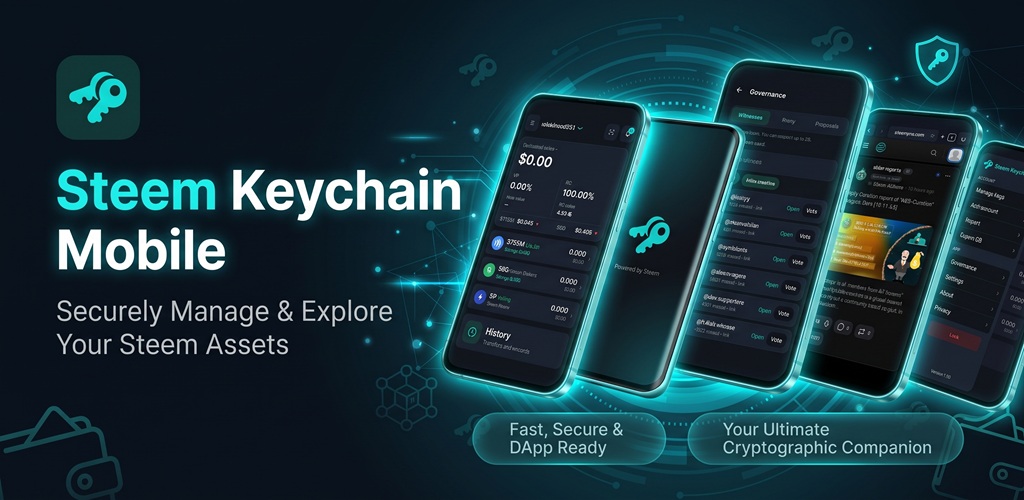
This post is the full announcement. It explains what the wallet is, which keys it stores, what each screen can do, how signing works, how to set it up safely, and where to read the source code.
Play Store: https://play.google.com/store/apps/details?id=com.steemkeychain.mobile
GitHub: https://github.com/banglawitness/steemkeychain-mobile
Open the Play Store link on an Android phone and install Steem Keychain. The package name is com.steemkeychain.mobile. If you want to read the code before you install, the GitHub repository above is public.
What this app is
Steem Keychain is a non-custodial wallet. That means the app keeps your private keys on the phone itself, locked behind a PIN you choose. There is no Steem Keychain account server holding your keys. The team cannot see your PIN, your fingerprint, or your private keys, and nobody at bangla.witness can sign a transfer for you.
When you approve a transaction, the phone signs it locally. Only the finished, signed operation is broadcast to the Steem node you have selected. The node learns the account name and the signed transaction. It does not receive the private key.
The app can store three kinds of keys: the posting key, the active key, and the memo key. You choose which of those to save. The owner key is never stored. Leave the owner key offline, on paper or in a separate backup that you control. Everyday actions such as posting, transfers, savings, delegation, and witness votes do not need the owner key.
Steem Keychain is a self-custody wallet. You hold the keys. You approve every transaction. A lost key cannot be restored by the team,, or by Steemit.
Why a phone wallet matters on Steem
A lot of Steem still happens in a browser. People write on Steemit, check accounts on SteemWorld, trade on SteemDex, and vote for witnesses from a laptop. That works, but it leaves a gap on the phone. Checking a balance, sending a small transfer, claiming rewards, or approving a signature request is awkward if the only tool is a desktop extension.
Steem Keychain puts those actions on the phone you already carry. The wallet shows balances, sends and receives, powers up and powers down, delegates Steem Power, handles savings and conversions, claims rewards, and opens a history of past operations. The same install also includes governance and an in-app browser, so a witness vote or a website signature request can be reviewed on the spot.
The app was built for people who already have a Steem account and want that account in their pocket, with the keys staying on the device.
Accounts
You can add a Steem account from inside the app and type in the keys you want this phone to keep. You can also import an account you already use. If you keep more than one account, the account drawer lets you switch the active account. Balances, history, governance, and signature requests all follow the account that is currently selected.
Export writes a backup of the accounts stored on the phone. Keep that backup somewhere other than the phone. A second copy, stored offline, is what saves you if the phone is lost, stolen, or reset. Import reads a backup back onto a phone when you are setting up again.
The scanner reads QR codes for an account and for a transaction request. The camera is used only for that scan. Photos are not uploaded.
Saved recipient names stay on the phone, so accounts you send to often are easier to pick the next time.
Wallet
The home screen is the wallet. It shows the STEEM balance, the SBD balance, and Steem Power for the active account. From there the main actions are grouped so each one opens a confirm screen before anything is broadcast.
Send. Transfer STEEM or SBD to another account. You enter the recipient, the amount, and an optional memo. The memo is encrypted with the memo key when the account has one. Nothing is broadcast until you confirm.
Receive. The Receive screen shows your account so someone else can pay you. Share it or let the other person scan it. You do not need to hand over a key to receive funds.
Power up. Power up moves liquid STEEM into Steem Power. Steem Power is what gives an account more weight in voting and a larger share of the reward pool over time. Powering up is a normal Steem operation, and the app signs it with the active key.
Power down. Power down starts the weekly conversion of Steem Power back toward liquid STEEM. Steem spreads a power down over several weeks. The app can start that process and you can review it before it is broadcast. Power down does not empty Steem Power in one transaction.
Delegate. Delegate assigns some of your Steem Power to another account so they can use that voting weight or resource, while the underlying Steem Power remains yours. You choose the account and the amount. You can change or remove a delegation later. Delegation is signed with the active key.
Convert. Convert starts an SBD conversion. Steem converts SBD to STEEM on the chain’s own schedule. The app submits that operation after you confirm the amount.
Savings. Savings is Steem’s slower balance. A deposit moves STEEM or SBD into savings. A withdrawal from savings is requested first and completes after the chain’s waiting period. The wallet can deposit and can request a withdrawal. The delay is a Steem rule, and it is there so a stolen active key cannot empty savings instantly.
Claim rewards. When curation rewards, beneficiary rewards, or other claimable balances are waiting, the wallet shows that rewards are ready. Claim collects them into the account. You confirm the claim before it is broadcast.
History. History lists past operations for the account so you can check what already happened: transfers, rewards, and other activity. It is a read of the chain, not a second ledger kept by the app.
Prices for STEEM and SBD can be loaded from CoinGecko so the wallet can show value. That request does not include your keys or your PIN.
Governance
Steem is governed by witness votes and by the decentralized autonomous organization proposal system. Both are in the app, under Governance. You need an account selected, and witness or proposal votes need the right key on that account.
Witnesses. A witness is a block producer. Each account can vote for up to 30 witnesses at the same time. The witness list shows producers you can support. Adding a vote or removing a vote is a signed operation. Voting for a witness you trust is how block production stays in the hands of the community. The wallet can also vote for @bangla.witness from Settings when the active key is on the phone.
Proxy. A proxy lets one account cast your witness votes for you. If you set a proxy, that account’s witness choices stand in for yours, and you no longer manage the list of 30 by hand. You can clear the proxy later and go back to voting yourself. The proxy screen explains that one account will cast those votes on your behalf.
Proposals. The proposal list shows Steem DAO projects, ranked by votes. You can read a proposal and vote for the ones you want the DAO to fund. Proposal votes are separate from witness votes. They decide which community projects receive funding from the DAO, and the app signs that vote the same way it signs any other operation: you review it, then you confirm.
Browser
The in-app browser is for Steem sites that need a wallet. Several sites are already listed, grouped so they are easy to open:
- Steemit, for posts, replies, and communities
- SteemDex, for token markets and swaps
- SteemWorld, for accounts, witnesses, and stats
- SteemPro, a full blogging front end
- SteemX, for reading and publishing on Steem
You can also open another address yourself. The browser keeps tabs, and it can remember history and bookmarks on the phone.
When a site asks the wallet to sign, Steem Keychain does not hand the private key to the page. The request is shown in a confirmation sheet. You read what the site is asking for, and you approve it with your PIN or reject it. If the phone is locked, you unlock first. A site can only receive a signature you explicitly approved.
That is the same idea as a desktop keychain: the website prepares the operation, the wallet holds the key, and the user is the person who allows the signature.
Security and settings
The first launch asks you to create a PIN. That PIN encrypts the keys stored on the phone. Without it, the wallet does not unlock. Choose a PIN you can remember and that other people do not know. The app cannot email you a reset code, because the keys never leave the phone.
If the phone supports it, fingerprint unlock can be turned on in Settings. Biometrics are a shortcut to the same locked vault. They do not send a fingerprint to Steem Keychain or to a Steem node.
Auto-lock controls how quickly the wallet locks again after you leave it. The choices are immediately, after 1 minute, after 5 minutes, or never. A shorter lock is safer on a phone you share or sometimes set down in public. “Never” keeps the session open until you lock it yourself, which is less safe if someone else picks up the phone.
The look of the app can be dark or light. The choice is stored on the phone.
The node list is the Steem API the app talks to. The default is a public node, and you can add your own. Settings can test the nodes and show latency, or show that a node is down, so you can switch when one is slow. Chain calls follow the node you pick. A custom node sees the same signed transactions a public node would see. It still does not receive your private key.
Notifications can be turned on separately for votes, replies, mentions, follows, and transfers. Those alerts are about activity around the account. They are optional.
Erase, in Settings, deletes the wallet from this phone. Uninstalling the app also removes its local data. Erase does not delete the account on the Steem blockchain. The account, the balances, and the history remain on chain. What disappears is the copy of the keys on that device. This is why an export backup matters before you erase or change phones.
How to install and set it up
- On an Android phone, open the Play Store listing and install Steem Keychain.
https://play.google.com/store/apps/details?id=com.steemkeychain.mobile - Open the app and create a PIN. Use a PIN you have not used on other sites.
- Add your Steem account. Enter only the posting key, active key, or memo key you actually want on this phone. Skip the owner key.
- If you already keep a backup from another device, use Import instead of typing keys again.
- Turn on fingerprint unlock if you want it, and set auto-lock to 1 minute or 5 minutes if the phone is with you during the day.
- Wait until the balance loads. If it does not, open Settings, test the nodes, and select a node that responds.
- Export a backup and store it away from the phone before you send a large transfer.
- Try a small transfer first, or a witness vote, so you can see the confirmation sheet before you rely on the wallet for larger amounts.
- Open the browser if you want Steemit or another Steem site to request signatures from this phone.
After that, Send, Receive, Power up, Power down, Delegate, Savings, Convert, Claim, History, Governance, and the browser are all available from the wallet.
What to protect
Write down the owner key and keep it outside the app. Anyone who has the owner key can change every other key. Anyone who has the active key can transfer funds, power up, power down, use savings, delegate, and vote for witnesses. Anyone who has the posting key can post, comment, and vote on content. Anyone who has the memo key can read encrypted memos. The phone should only hold the keys you are willing to use on a mobile device.
Confirm every signature request before you approve it. Check the account name, the amount, and the operation. A website can ask for a signature. The confirmation sheet is where you decide.
Keep the Play Store install updated. Future versions will use a higher version code, and Google Play will deliver the update to the same app. The source for this release is the GitHub repository maintained with the project.
Source code
Steem Keychain is open source. The repository is here:
https://github.com/banglawitness/steemkeychain-mobile
You can read how accounts, the PIN vault, signing, the browser bridge, and governance screens are built. Issues and contributions go through that repository. A public codebase means the wallet’s behavior can be inspected by anyone who wants to see what the app does with a key.
The app does not show ads, and it does not sell data. Browser history, bookmarks, the selected node, the theme, and notification settings stay on the device. Chain requests go to the node you choose. Price requests go to CoinGecko without your keys.
Who built it
Steem Keychain is built by the @bangla.witness team. bangla.witness is a Steem witness, and this wallet is part of the work that witness is doing for people who use Steem from a phone, including the Bengali community and anyone else who wants a simple Android wallet.
A witness stays active when accounts vote for it. If this app is useful to you, a witness vote for @bangla.witness supports the people maintaining it. You can vote from the Governance screen, or use the Vote for @bangla.witness button in Settings. That vote is broadcast only when the account on the phone has an active key, and only after you confirm it.
Closing
Steem Keychain on Google Play is the mobile wallet for holding posting, active, and memo keys, sending and receiving, managing Steem Power, using savings, claiming rewards, voting in governance, and approving website signatures. The keys stay on the phone. The owner key stays out of the app. Every broadcast waits for your confirmation.
Install it from Google Play:
https://play.google.com/store/apps/details?id=com.steemkeychain.mobile
Read and follow the code on GitHub:
https://github.com/banglawitness/steemkeychain-mobile
Try the wallet, and leave questions or feedback in the comments of this post. Tell us what you used first: a transfer, a witness vote, a reward claim, or a signature from the in-app browser.
This is a fantastic development for everyone on the STEEMIT platform, You’ve done an amazing job! I’ve often thought about this and even searched for it, but I could never find anything. I am absolutely delighted that you’ve launched this for mobile. Thank you so much! I hope you continue to launch apps with such excellent features in the future as well.
BUNDLE OF THANKS
0.00 SBD,
24.37 STEEM,
24.37 SP
Thank you.
Without a doubt, this is a brilliant achievement. The STEEMIT platform really needed this, and you have paved the way to fulfill that need perfectly. I want to thank you for your remarkable effort and for working on this. I will definitely check it out!
0.00 SBD,
23.81 STEEM,
23.81 SP
Thank you.
It is nice
time to Resteem
0.00 SBD,
23.52 STEEM,
23.52 SP
thank you.