[Proposals] Steem Wallet Vault Mode and Dapp Signing Whitepaper
Audience: Steem Wallet users, dapp users, and community members
Date: 2026-10-28
Document type: User and community edition; this does not replace the implementation blueprint
Related Issue:: https://github.com/steemit/wallet/issues/381
Reading note
This document distinguishes two periods:
- Current experience: describes Steem Wallet’s existing login, session-key, and “remember me” behavior.
- Future experience: describes the planned Vault Mode and dapp operation signing. These features have not launched. Final interfaces and delivery timing remain subject to review and release decisions.
A vault is not a cloud wallet. It cannot recover your Steem password for you, and it does not change Steem’s on-chain authority rules. It first addresses a more basic problem: giving multiple accounts and private keys in the browser a clear home with encryption, locking, and backup support.
1. The current user experience
1.1 What you enter when logging in
To log in to Steem Wallet today, you enter an account name and a secret. That secret can be:
- a Steem private key, usually a WIF string beginning with
5; or - the account’s master password, from which the browser derives role-specific private keys locally.[9]
The wallet checks whether the derived or entered public key belongs to the account. After a successful login, available owner, active, posting, and memo private keys are kept in the current page’s session state for later operations.[9][10]
This means that “logged in” only shows that the wallet has verified your control of a recognized key. It does not mean that key is suitable for every operation. For example, a memo key can encrypt and decrypt memos but is not a transaction authority. The current login flow accepts a memo-key match, but that does not grant the ability to transfer funds or post.[9][11]
1.2 Different operations require different authorities
The typical experience today is:
- Viewing balances and public information does not require exposing a private key.
- Posting, voting, or claiming certain rewards requires posting-class authority.
- Transfers, market operations, Power Down, and delegation require active-class authority.
- Changing account authorities or performing recovery-related operations may require owner-class authority.
If your login does not provide sufficient authority, the wallet asks you to re-authenticate. Steem authority is hierarchical for signing: owner can cover active and posting, and active can cover posting, but not the reverse. Memo is independent of this transaction-authority hierarchy.[29]
Users therefore need to understand not only “am I logged in?” but also “which key did this login bring into the session?”
1.3 Refresh, “remember me,” and re-authentication
Current session private keys are primarily kept in page memory, so a refresh clears this session state.[10]
“Remember me” is a separate state. If the user explicitly opts in, the browser’s localStorage stores the username and, when available, the posting key in plaintext. When the user later logs in with an active or owner key, the wallet may restore that saved posting key for posting operations such as claiming rewards.[8][9]
This creates several experience problems:
- The page session, remembered username, and remembered posting key do not share one lifecycle.
- The boundaries between refresh, re-authentication, logout, and device access are not intuitive.
- There is no single, clear “wallet is locked” state.
- The single-account model does not comfortably support multiple Steem accounts.
- Current public-key matching primarily checks the first public key in each authority, leaving multi-key and weighted-account support incomplete.[9][11]
Most importantly, the current “remember me” mechanism is not an encrypted vault. Same-origin JavaScript, malicious extensions, or anyone with access to that browser environment may be able to read the plaintext posting key.[8]
2. Four private keys and two kinds of passwords
2.1 What private and public keys are
A Steem private key is a secret that controls a particular capability, commonly represented in WIF format. The corresponding public key can be recorded openly on chain and used to verify signatures; the private key must not be given to others.
Signing does not mean giving your private key to a website. Normally, the website uses your private key locally to produce a signature, and Steem nodes verify it with the corresponding public key.
2.2 The four role-specific private keys
| Secret | Primary purpose | Can it directly transfer funds? | Recommended use |
|---|---|---|---|
| Owner private key | Changes account authorities and recovery settings; can also cover active/posting authority | Yes, through active-class coverage | Keep offline by default; do not import into a daily-use wallet unless necessary |
| Active private key | Transfers, market operations, Power Down, delegation, and other funds/account operations; can also cover posting | Yes | Use and store only when needed |
| Posting private key | Posts, comments, votes, follows, posting custom_json, reward claims, and similar operations | No, but it can damage the account’s reputation | Suitable for routine social operations; still a sensitive secret |
| Memo private key | Encrypts and decrypts private memos | No | Use only for memos, never for transaction signing |
Least-privilege principle: if posting authority is sufficient, do not select owner or active merely because it happens to be available.
2.3 Steem master password
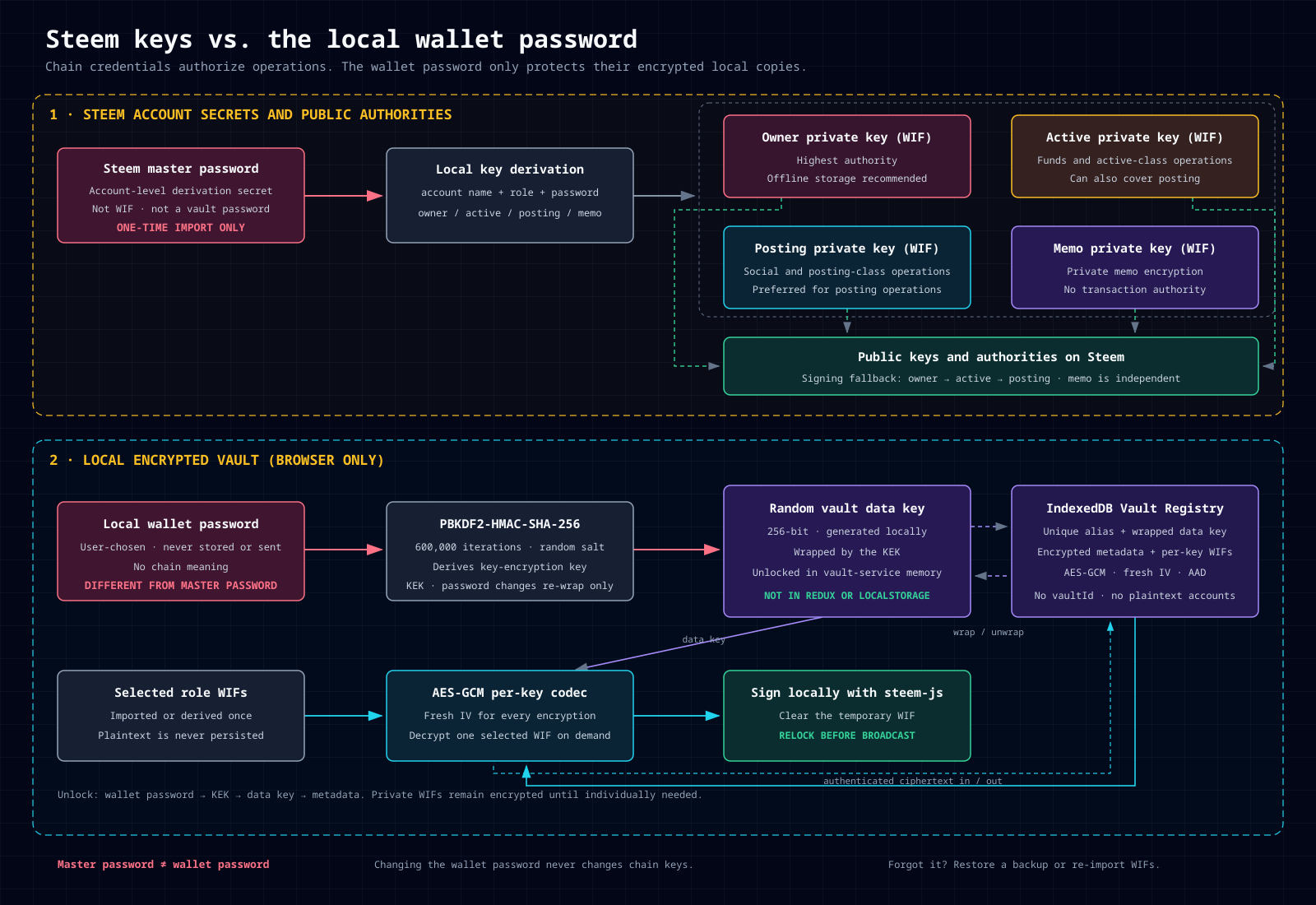
A master password is an account-level derivation secret. It is not a WIF and is not a fifth kind of on-chain authority.
For accounts whose keys were originally generated through this derivation scheme, the browser can combine:
account name + master password + role
to derive owner, active, posting, and memo private keys locally.[9]
Important qualifications:
- It is useful only while the derived keys still match the account’s current public keys on chain. Re-entering a master password does not reset chain keys.
- A compromised master password may expose the entire set of role keys.
- During a future vault import, it should be used only in an explicit one-time operation to derive and select WIFs to retain. The master password itself is never saved.
2.4 Local wallet password
A wallet password is the local encryption password independently chosen for each future vault:
- It is not a Steem private key.
- It represents no on-chain authority.
- It cannot transfer funds, post, or change account authorities.
- It is never sent to a Steem node, the wallet server, or a dapp.
- Changing it does not change any Steem private key or on-chain authority.
Its only role is to help derive a key-encryption key, which then unwraps the vault’s random data key. That random data key is what actually encrypts account metadata and each WIF.
You can think of it as:
wallet password
      ↓ derived locally
key-encryption key
      ↓ unwraps
vault random data key
      ↓ decrypts on demand
account metadata and one selected WIF
3. What Vault Mode is
3.1 Multiple vaults in one browser
The future Vault Registry allows multiple vaults under the same browser origin. Each vault has:
- a user-chosen alias that is unique within that browser;
- an independent wallet password;
- an independent random data key;
- multiple Steem accounts;
- multiple role-specific private keys per account, including multiple keys per role and their weight information.
For example:
Vault Registry
├── personal        personal-account vault
│   ├── alice       posting, memo
│   └── bob         active, posting
└── work            work-account vault
    ├── company-a   posting
    └── company-b   active, posting
An alias is only a management label. It is not a secret or a separate hidden account number. Different vaults have independent encrypted data and data keys.
Weights and thresholds describe how on-chain authority is currently configured; they are not intrinsic properties of a private key. Changing them requires an on-chain account_update. Editing only a local display value has no chain effect.
3.2 A vault is neither a cloud account nor a new chain authority
A vault does not:
- create a new kind of account on Steem;
- custody private keys on your behalf;
- synchronize the encrypted vault to the wallet server;
- replace chain signatures with the wallet password;
- give a memo key transaction authority;
- turn locally edited weights into on-chain authority changes.
It is simply an encrypted key store in the local browser. The chain still accepts only valid on-chain signatures.
3.3 Encrypted storage and locking
Vault data will be encrypted in IndexedDB rather than stored as plaintext private keys in localStorage. localStorage is reserved for non-sensitive preferences and migration-time legacy data.
Users can lock or unlock a vault:
- Unlocking requires that vault’s wallet password.
- Unlocking happens locally in the browser and works offline.
- A refresh always starts in the locked state.
- Switching the active vault first locks the previous one.
- Normal use relocks after a period without vault activity.
- After a dapp signature, the vault relocks immediately before broadcasting.
“Active vault” and “unlocked vault” are not the same thing. Active only identifies the vault currently selected for management; it does not prove that the vault is unlocked.
3.4 How to enter Vault Mode
In the future, a Work Mode selector will appear below the language switcher in the right drawer:
- PrivateKey Mode: the current model retained during migration, with a Deprecated annotation.
- Vault Mode: enables vault management and the new signing flow.[36][37]
The selector remains visible in both modes and while logged out. Switching does not navigate or refresh the page, and never automatically creates, activates, or unlocks a vault.
Entering Vault Mode clears legacy session private keys. Switching back to PrivateKey Mode locks the vault while preserving its encrypted records. PrivateKey Mode hides Vault Manager but keeps the Work Mode control available so users can always switch back.
If no vault exists, the page asks:
You do not have any vault yet. Create/import one now, or continue browsing?
The user can choose Create, Import, or Continue browsing. Continuing only dismisses the prompt; it grants no signing capability, and the next signing attempt prompts again.
3.5 What users can manage
In Vault Mode, Vault Manager will support:
- creating and importing vaults;
- explicitly selecting an active vault;
- renaming aliases;
- exporting encrypted backups;
- importing a backup as an independent vault;
- merge-migrating a backup into a selected existing vault;
- locking or removing vaults;
- after unlocking, viewing accounts, balances, and imported-role summaries.
Merge migration never silently overwrites the target vault. It backs up the target first, deduplicates accounts and keys, and rolls back the entire migration on failure.
4. What users must keep safe
4.1 The three most important kinds of recovery material
| What to preserve | Why it is needed | Recommended practice |
|---|---|---|
| Each vault’s wallet password | Unlocks that vault and its encrypted backups | Use a password manager or an offline memorization method; use a different strong password for each vault when practical |
| The vault’s encrypted backup file | Restores the vault after browser-data loss, clearing, or device damage | Keep at least two independent offline copies and periodically verify that they can be imported |
| Independent Steem owner credentials | Preserves an on-chain control and recovery path if the vault cannot be restored | Keep a currently valid owner WIF or matching master password securely offline |
A vault alias, public key, account name, or transaction id is not a recovery secret. Knowing only the alias cannot restore a vault.
4.2 Recommended backup procedure
- When creating a vault, use a strong password of at least 14 characters, preferably generated by a password manager or composed of at least four words.
- Export an encrypted backup immediately after creation.
- Store backups and the wallet password separately—not in the same cloud-drive folder, on the same note, or in the same email.
- Verify one import and unlock in a safe, separate browser profile.
- Export a fresh backup after adding or removing accounts, importing new keys, or merging backups.
- Preserve an owner-credential recovery path that does not depend on the browser, and confirm that it still matches current on-chain authority.
Although an encrypted backup contains no plaintext private keys, it is still sensitive. Anyone who obtains it can make long-term offline password guesses, and a weak password significantly reduces the encryption’s protective value.
4.3 What happens when something is forgotten or lost
| Situation | Can it be recovered? |
|---|---|
| Wallet password forgotten, but the device and vault remain available | If still unlocked, export and re-protect immediately; if locked, the wallet cannot crack the password for you |
| Wallet password forgotten, but the encrypted backup and original WIF/master password remain | Re-import the original keys; the backup alone cannot be decrypted without its password |
| Browser data cleared, but the backup and corresponding password remain | Re-import the backup |
| Backup and password lost, but independent owner credentials remain | Rebuild a local vault; on-chain recovery depends on whether those credentials are still valid |
| Backup, password, and usable Steem credentials all lost | Steem Wallet cannot recover them |
There is no “forgot my wallet password” reset service. This is a direct consequence of non-custodial design: the server has neither your password, data key, nor private keys, so it cannot decrypt the vault for you.
4.4 Changing a password does not revoke old copies
Changing a vault password does not change Steem private keys and does not invalidate previously exported backups.
If you suspect that an old password or backup has been compromised, changing only the password is insufficient. Instead:
- Create an independent vault with a new password and a new random data key.
- Re-encrypt every key that should be retained.
- Verify a new backup.
- After confirmation, remove the old vault and any accessible old backups.
If a Steem private key itself may have been exposed, the corresponding on-chain authority must also be rotated. Changing only the local password cannot stop someone from using an exposed WIF directly.
5. Future dapp operation signing
5.1 What problem it solves
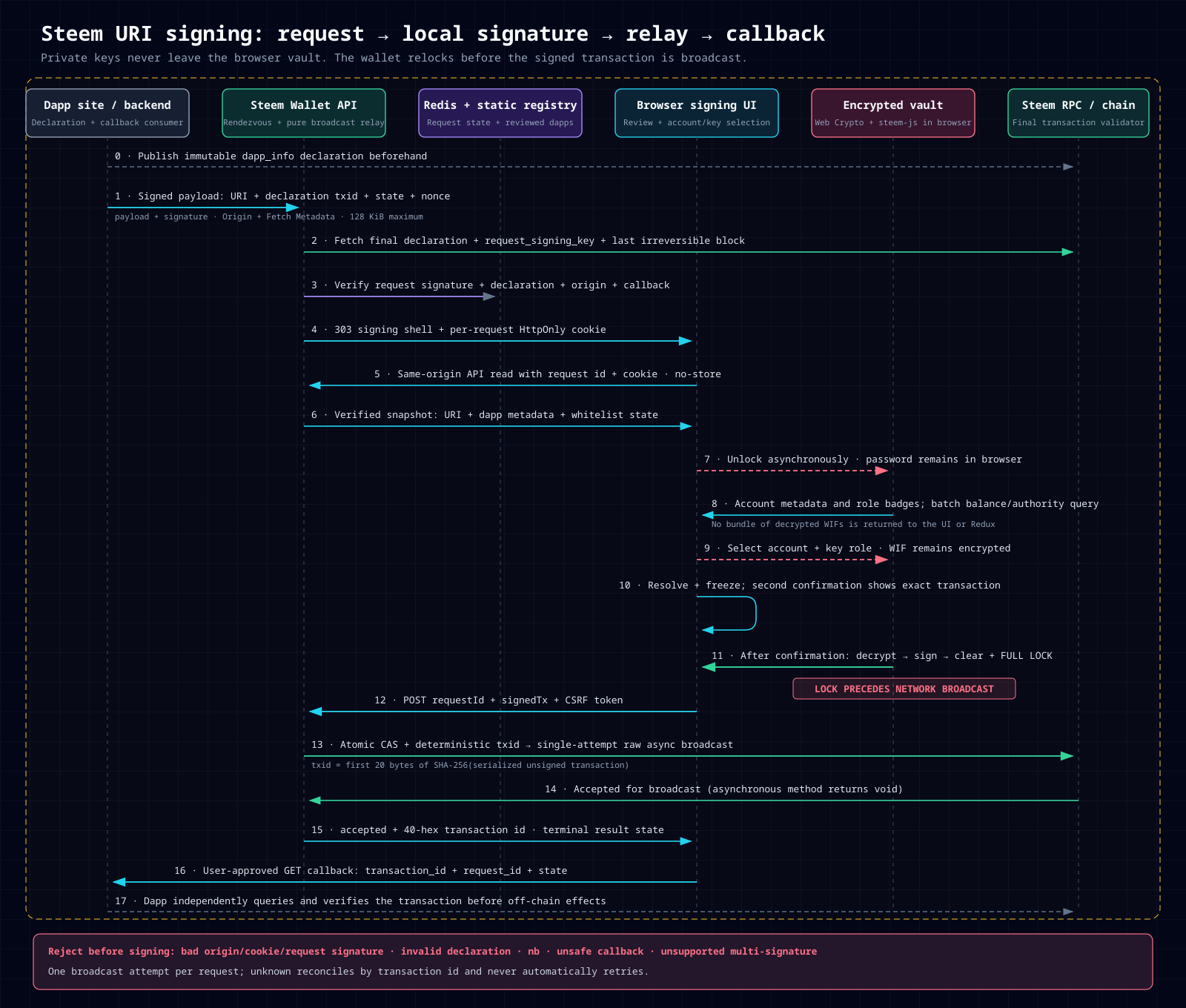
In the future, a dapp can ask Steem Wallet to sign an operation, such as a posting custom_json, vote, or another Steem operation. Users do not need to give the dapp a WIF or master password.
Throughout the process:
- the dapp supplies the operation to be signed;
- the wallet displays its actual contents;
- the user selects an account and key locally;
- the browser signs locally;
- the wallet server relays only the signed transaction;
- the Steem chain performs final validation.[14]
A dapp should never ask for your wallet password, master password, or WIF.
5.2 Dapp identity and the whitelist
A dapp first publishes a declaration through a Steem custom_json, containing its name, description, website, callback URL, and dedicated request-signing public key.[6][7]
That declaration uses the dapp’s own request key, not the user’s owner, active, posting, or memo private key. Changing the dapp website, callback, or request key requires a new declaration generation. A signing request that has already been created continues to use the information and callback pinned at creation.
A dapp may apply for whitelist listing. Listing means only that the declaration and origin passed the documented review; it does not mean every transaction requested by that dapp is safe.
If a dapp is not whitelisted, the signing page shows a prominent risk warning. The user may continue, but should treat it as a reason for additional scrutiny rather than dismissing it.
5.3 The signing flow users will see
- Start in the dapp. The user clicks Sign in the dapp, and the dapp submits the encoded operation and declaration transaction id to the wallet.
- The wallet verifies the request. It validates the dapp declaration, request signature, and request origin. It does not verify the user’s private key at this stage.
- See the requester. The page displays the dapp name, description, website, actual request origin, whitelist status, and final callback destination.
- Enter Vault Mode. If the current mode is PrivateKey Mode, the page says “This page supports Vault Mode only; click to learn more”. The user can open the right drawer with Work Mode focused and continue the original request after switching, without a page refresh.
- Unlock and select an account. The user unlocks a vault asynchronously on the current page, sees its accounts, balances, and imported-role summaries, and selects an account and appropriate role key.
- Review the operation. The page lists every operation and field and provides a raw JSON view instead of replacing the actual contents with a vague “this app wants to sign” message.
- Confirm a second time. Clicking a key opens a dialog showing the final resolved and frozen transaction, signer account, role, dapp, origin, and callback. The private key is still encrypted at this point.
- Sign locally and lock immediately. Only after confirmation does the browser decrypt the selected WIF and sign. It then clears the unlocked state immediately. Only the signed transaction is submitted to the server relay.
- Return after a final prompt. The wallet displays the transaction id and exact HTTPS callback destination. Only after the user clicks “Continue to dapp” does it return the result through GET parameters.
5.4 A returned transaction id does not mean final confirmation
When the wallet returns a transaction id, it associates the signed transaction with a broadcast request. It does not prove irreversible confirmation.
The dapp must still query the chain, compare the operations and signer, and wait for a confirmation level appropriate to its business risk. The callback itself is not proof of success.
If the broadcast outcome is uncertain, the wallet preserves reconciliation information but does not automatically broadcast again or encourage blind re-signing. Users should not immediately resubmit the same operation merely because it is temporarily “not found.”
5.5 First-release boundaries
The first dapp-signing release focuses on normal sign-and-broadcast requests that one selected key can satisfy:
- no
no_broadcastsignature collection; - no multisignature coordination,
account_auths, or threshold aggregation; - no arbitrary dynamic callback destinations;
- no use of the whitelist as transaction-content review;
- no change to legitimate multisignature requirements in existing recovery flows.
These limits keep the first dapp-signing path clear and reviewable.
6. Security responsibilities that remain with the user
A vault improves key custody but cannot remove every risk:
- Same-origin XSS can read ciphertext in the browser and wait for the next unlock in an attempt to capture a password or private key.
- Malicious browser extensions may bypass the page’s own protections.
- Other users of a shared device may access the same browser environment. People who do not trust each other should use separate operating-system or browser profiles.
- Phishing interfaces may imitate a dapp’s name or description. Users should verify the actual request origin, callback destination, and final transaction.
- Weak passwords make stolen encrypted backups easier to attack through offline guessing.
“Vault locked” is therefore not a universal security guarantee. Keeping the browser updated, minimizing extensions, using separate profiles, and carefully reviewing the final confirmation dialog remain necessary.
7. How migration will happen
During the initial Vault Mode release, PrivateKey Mode remains the default and is marked Deprecated, avoiding an abrupt break for existing users.
Users can explicitly change Work Mode in the right drawer. For a plaintext posting key previously saved through “remember me,” the migration wizard offers to:
- validate and encrypt it into a new vault; or
- remove it from the browser.
Legacy plaintext entries should be removed only after the encrypted vault has been written, read back, and successfully unlocked. Users can also import other WIFs manually later.
After all signing consumers, backups, and migration acceptance checks pass, PrivateKey Mode and the legacy login backend will be removed rather than maintaining two signing architectures indefinitely.
8. Frequently asked questions
Can a wallet password replace a Steem master password?
No. The former protects only the local vault; the latter may derive on-chain role keys. They are not interchangeable and cannot reset each other.
Do I need a vault if I use only one account?
A single account still benefits from a clear lifecycle with encryption, locking, and backup support. Multi-vault and multi-account capabilities are optional; you are not required to create more accounts.
Must I import my owner key into a vault?
No. Offline storage remains the recommended default for an owner key. Import it only after understanding the risks and completing the additional high-risk confirmation when you have a specific need.
Will my vault appear automatically on another computer?
No. Vaults do not synchronize by default. You need to carry an encrypted backup and its corresponding wallet password into the new environment and import them.
Is it safe to sign whenever a dapp is whitelisted?
No. Listing is only an identity and origin review signal. Always review the exact operation, signer account, role, and callback destination.
Can a dapp obtain my private key or wallet password?
Not under this design. Unlocking and signing happen locally in the browser, and neither the dapp nor the wallet server should receive those secrets. Treat any dapp that directly asks for a WIF, master password, or wallet password as high risk.
9. The core checklist for users
When Vault Mode launches, the most important task is not memorizing more technical terms. It is completing these actions:
- Understand the purposes of owner, active, posting, and memo keys, and sign with the least privilege.
- Use an independent, sufficiently strong wallet password for each vault.
- Preserve encrypted backups and store them separately from their passwords.
- Back up again after adding or changing keys, and actually verify restoration.
- Maintain an additional valid, offline Steem owner-credential recovery path.
- Do not treat a vault alias as a secret, or a backup file as harmless data that can be shared publicly.
- Before signing, verify the dapp origin, whitelist warning, final transaction, and callback destination.
- Never give a WIF, master password, or wallet password to another person or a dapp.
Your chain keys determine what you can do; your vault password determines whether someone can decrypt your local key store; your encrypted backup determines whether you can rebuild it after browser data disappears. Protect all three independently.
Sources
[6] https://github.com/steemit/steem-uri-spec/blob/ab4846266c171e2e029bef62b633aff970488687/README.md — Steem URI protocol signing and callback specification
[7] https://github.com/steemit/steem-uri-spec/blob/ab4846266c171e2e029bef62b633aff970488687/src/index.ts — Steem URI 0.2.2 decode resolve and callback implementation
[8] https://github.com/steemit/wallet/blob/55e3092f163ca05e78a5f695b56e9b13b4719176/src/lib/auth/browser-storage.ts — Current wallet browser storage policy
[9] https://github.com/steemit/wallet/blob/55e3092f163ca05e78a5f695b56e9b13b4719176/src/components/auth/login-form.tsx — Current wallet login and remembered-key flow
[10] https://github.com/steemit/wallet/blob/55e3092f163ca05e78a5f695b56e9b13b4719176/src/lib/store/slices/auth.ts — Current wallet Redux credential state
[11] https://github.com/steemit/wallet/blob/55e3092f163ca05e78a5f695b56e9b13b4719176/src/app/api/auth/login/route.ts — Current wallet challenge login without server session
[14] https://github.com/steemit/wallet/blob/55e3092f163ca05e78a5f695b56e9b13b4719176/src/lib/steem/server.ts — Current wallet asynchronous broadcast relay
[29] https://github.com/steemit/steem/blob/52dcfabb0404c77da444678e90ccac7954d05ecc/libraries/protocol/include/steem/protocol/transaction_util.hpp — Steem core mixed posting authority rule
[36] https://github.com/steemit/wallet/blob/55e3092f163ca05e78a5f695b56e9b13b4719176/src/components/layout/side-panel.tsx — Current wallet right-side drawer and language-switcher placement
[37] https://github.com/steemit/wallet/blob/55e3092f163ca05e78a5f695b56e9b13b4719176/src/components/i18n/language-switcher.tsx — Current wallet dropdown radio-group language switcher
Upvoted! Thank you for supporting witness @jswit.
A secure, encrypted vault implementation for local key management is a very welcome architectural step for browser-based blockchain wallets. Clear separation of session lifecycles and least-privilege key handling improves overall security.