How to See What People Like on Instagram in 2026: A Snoopreport Overview

Likes are the quietest signal on Instagram. Nobody announces them, yet every heart says something about what a person enjoys, which creators they pay attention to and which brands have caught their eye. For years you could watch that signal in real time through the Following tab. Then it disappeared.
If you want to see what people like on Instagram today, you need a different approach. This overview explains what changed, what you can still check by hand, and how Snoopreport turns scattered likes into a readable weekly report.
What Happened to the Following Tab
Until October 2019, Instagram's activity feed had a Following tab that showed the likes, comments and follows of the accounts you followed. Instagram removed it, and the company explained that people didn't always realize their activity was being surfaced to others. The data itself didn't go away. Likes on public posts are still public; they are just no longer collected in one convenient place.
That's why most people who want to see what people like on Instagram end up doing one of two things: digging manually, or using a service that does the digging for them.
Checking Likes by Hand
The manual route works for a quick look, but it's slow. Here is what it usually involves:
Open a public post from an account the person is likely to interact with, such as a friend, a favorite creator or a brand.
Tap the likes to open the list of people who liked it, and search for the person's username.
Repeat for dozens of posts across different accounts, and note down every match.
This approach can work for a single question, such as whether a friend liked a specific post. It doesn't scale to the real goal, which is understanding what someone is into over weeks or months.
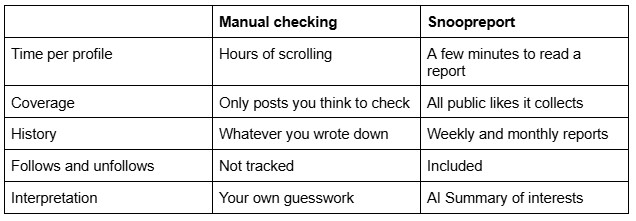
Even if you have the patience, you only find likes on posts you thought to check. Anything outside your guesses stays invisible, and you get no sense of timing or patterns.
The Faster Way: Snoopreport
Snoopreport was built for exactly this problem. Since 2017 it has helped more than 500,000 users understand Instagram activity without the manual work. You enter a public profile, and Snoopreport collects its public activity into weekly or monthly reports.
What the reports show
Liked posts and reels. See which content the profile liked, from which accounts, and when.
Follows and unfollows. New connections and dropped ones, in one timeline.
Active hours. When the profile tends to be most active on Instagram.
AI Summary. A plain-language description of interests and habits, plus ideas such as gifts or conversation starters based on real activity.
How it works
Sign up on snoopreport.com and add the public profile you're curious about.
Wait for the first report; Snoopreport builds history over time.
Open the dashboard to browse likes, follows and the AI Summary, or check the sample report first to see the format.
You don't install anything to get started, your own Instagram account is never connected, and plans start at $0.99 a week. There's also an iOS app if you prefer checking reports on your phone.
Who Uses Likes Data, and Why
People look at likes for very different reasons, and most of them are refreshingly ordinary:
Gift hunters who want to know what a friend or relative is into before a birthday.
Fans following what their favorite creators and celebrities engage with.
Marketers studying which content and influencers their audience responds to.
Small brands checking which competitors' posts get attention from the customers they want.
In every case, likes add context that a profile page alone can't give you: not what someone posts, but what they respond to. Someone who rarely posts may still like dozens of things a week, which makes likes the most honest view of their interests.
Manual Checking vs Snoopreport
How to Read Likes Without Jumping to Conclusions
Likes are a strong signal, but they need context. A few habits make the data far more useful:
Look for patterns, not single likes. One like on a cooking video means little. Twenty likes on cooking videos over a month says the person is into cooking.
Watch the accounts, not just the posts. If someone repeatedly likes content from the same creator, that creator matters to them.
Compare periods. Interests shift. Comparing this month's report with last month's shows what's new and what's fading.
Combine likes with follows. A new follow followed by a run of likes on that account is a clear sign of fresh interest.
Snoopreport's AI Summary applies the same logic automatically. It looks across likes and follows, groups them into interests and describes them in plain language, so you don't need to build a spreadsheet to spot the trend.
Getting the Most From Your Reports
A little setup goes a long way. Add the profiles you genuinely care about rather than dozens at once, and give each one a few weeks to build history. Read the AI Summary first for the big picture, then dive into the liked posts for detail. If you're researching for a gift, note the creators and brands that keep coming up; if you're researching a market, note which content formats get the most likes from the accounts you track. Over time, these notes turn into a clear picture of what people actually respond to, which is something no follower count can tell you.
A Word on Safety
Searching for ways to see what people like on Instagram will also lead you to apps that ask for your Instagram username and password. Treat that as a warning sign. A service holding your login can access your account, act on your behalf and get you flagged for suspicious activity. Snoopreport doesn't need your login at all; it works only with public data, and there's nothing for it to access on your side.
Frequently Asked Questions
Can I see likes from a private account?
No. Private accounts' activity is only visible to approved followers, and no legitimate service can bypass that. Snoopreport works with public profiles only.
Will the person know I'm looking at their likes?
No. Snoopreport doesn't use your Instagram account, doesn't follow the profile and doesn't view stories on your behalf, so nothing about your research appears on their side.
How far back does the data go?
Reports build history from the moment you add a profile, weekly or monthly. The longer you track, the clearer the patterns become.
Do I need a separate app on my phone?
No. Snoopreport works in the browser, so you can start without installing anything. If you prefer your phone, an iOS app is available as well.
The Bottom Line
Instagram took the Following tab away, but likes still tell a story for anyone who knows where to look. Checking by hand gives you fragments; Snoopreport gives you the whole picture in one report, with an AI Summary on top, for $0.99 a week. Try it at snoopreport.com with the first profile you're curious about.