How to Manage Online and Offline Inventory From One POS System
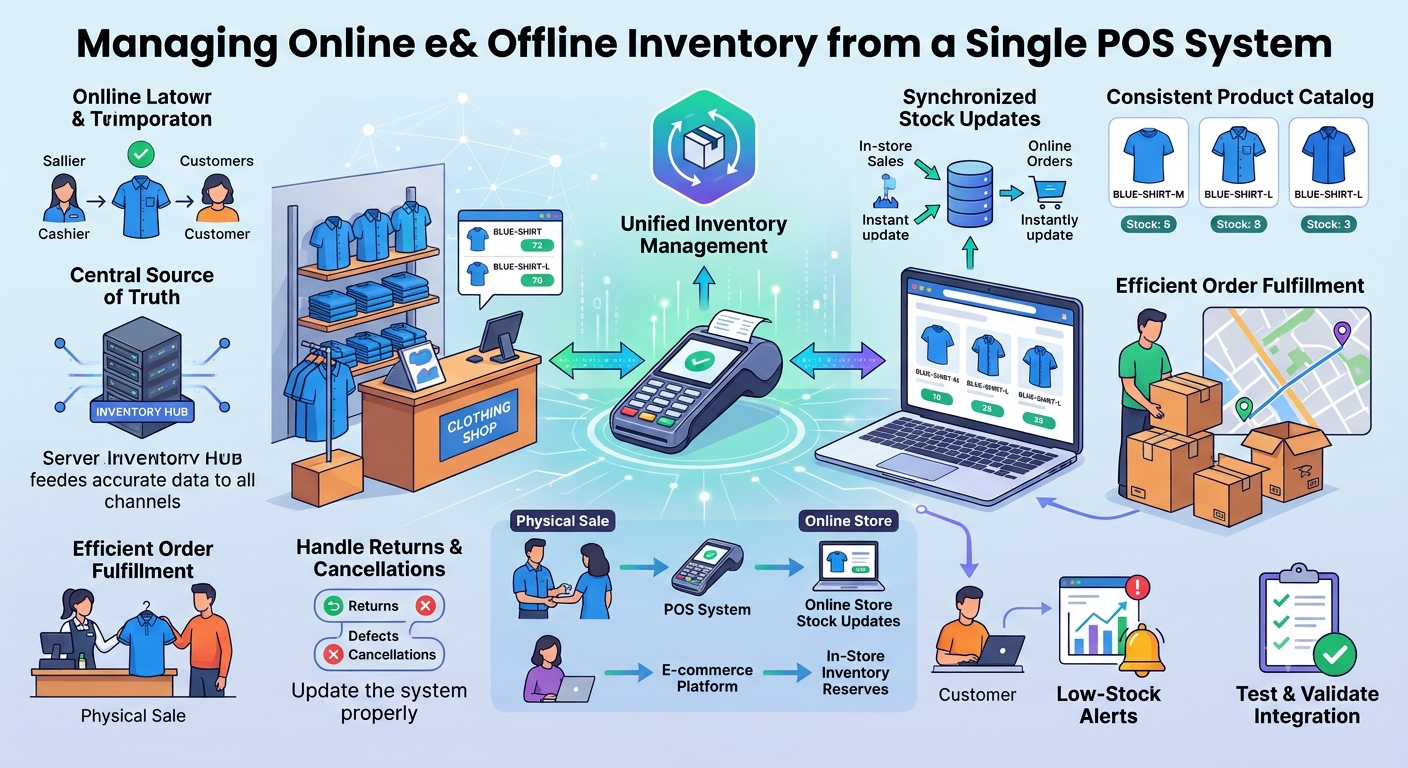
Imagine you run a clothing store that sells products from a physical shop and an online website.
In the morning, your inventory shows five blue shirts in size M. During the day, three customers purchase them in your physical store. Meanwhile, someone visits your website and places an order for one of the same shirts.
If your online store has not received the latest stock update, it may still show five shirts available instead of two.
Now your business has a problem. The website is accepting orders based on outdated inventory information, and your team must figure out how to fulfil them.
This is one of the challenges retailers face when they sell through multiple channels without a connected inventory system.
A POS system that integrates with your online store can help bring inventory information together, making it easier to manage stock, track sales, and reduce avoidable order cancellations.
Why Managing Online and Offline Stock Separately Becomes Difficult
When a business sells through a physical shop and an online store, each channel creates inventory changes.
In-store purchases reduce stock. Online orders reserve or deduct products. Supplier deliveries increase stock, while returns and damaged goods require additional adjustments.
If these changes are recorded in separate systems, employees may need to update inventory manually or rely on delayed synchronization.
This creates opportunities for mistakes. The website may show a product as available after it has sold in the shop. Staff may reorder products that are already in stock elsewhere. The owner may also struggle to understand the actual inventory position without checking multiple records.
These problems become more noticeable when the business has many products, different sizes and colors, or several sales locations.
The solution is not simply to maintain more spreadsheets. It is to establish a reliable inventory process that connects the channels where your products are sold.
How One POS System Can Connect Inventory Across Channels
A connected POS setup allows physical store sales and online orders to update inventory through a shared system or a dependable synchronization process.
Consider a shop that has 20 units of a product available.
When a customer buys two units at the physical counter, the POS records the sale and updates the available quantity. The connected online store then receives the updated stock information.
If an online customer places an order for three units, the system records that inventory change as well. The physical store should then work from the updated quantity rather than its previous stock figure.
The exact workflow depends on the POS software and integration. Some systems use a central inventory service, while others synchronize stock between connected platforms.
What matters is that sales from both channels are reflected accurately and quickly enough to support reliable order fulfilment.
For products with limited stock, the system must also handle simultaneous purchases safely. Simply sending updates between two systems may not be enough if both channels attempt to sell the final unit at the same time.
Start by Organizing Your Product Catalog
Before connecting your POS system to an online store, make sure your product catalog is consistent.
Each product should have a clear name, unique identifier or SKU, selling price, and relevant inventory details. If you sell variants such as different sizes, colors, or models, each variant should be identifiable separately.
For example, a medium blue shirt and a large blue shirt should not share the same stock record if they are stocked and sold separately.
Consistent product identifiers help the POS system match a physical sale with the correct item in the online catalog.
It is also important to review duplicate products, incorrect prices, inactive items, and outdated stock quantities before synchronization begins.
A connected system can only maintain useful inventory records when the underlying product data is accurate.
Establish One Reliable Source of Inventory Information
One of the most important decisions is determining which system controls the inventory quantity.
If the POS and website both maintain independent stock numbers without clear synchronization rules, discrepancies can continue to occur.
A well-designed setup uses a defined source of truth, such as a central inventory service or the inventory management component of a connected POS platform.
When a sale, return, delivery, or stock adjustment occurs, the system records the event and updates the quantity available to the relevant channels.
For online orders, it is useful to distinguish between physical stock and stock available for sale. A product may physically exist in the store but already be reserved for an online customer.
For example, if your shop has ten units but two are reserved for confirmed orders, only eight may be available for new purchases, depending on your fulfilment rules.
This distinction helps prevent the website from promising products that have already been committed elsewhere.
Decide How Online Orders Will Be Fulfilled
Inventory synchronization becomes more complicated when online orders can be fulfilled from different locations.
A business may ship products from its main store, a warehouse, or one of several branches. The system needs clear rules for deciding where an order should be fulfilled.
For a small retailer with one physical shop, using that shop as the main fulfilment location may be sufficient.
For a business with multiple branches, it may be useful to track stock separately by location. The system can then help staff identify which branch has the required quantity.
Before enabling online sales, define how your team will handle picking, packing, dispatch, and stock transfers. Also decide what should happen if the selected location does not have enough inventory to fulfil an order.
The right setup depends on your business model, delivery commitments, and the capabilities of your POS and e-commerce systems.
Handle Returns, Cancellations, and Stock Adjustments Correctly
Inventory management does not end when a customer purchases a product.
Online orders may be cancelled, payments may fail, products may be returned, and physical stock counts may reveal discrepancies.
Each event should follow a defined process.
If an order is cancelled before dispatch, the system may release its stock reservation. If a product is returned, the item should be inspected before being made available for resale. Damaged goods should remain unavailable until their status is resolved.
When a supplier delivers new stock, the receiving process should update the appropriate inventory location. Manual corrections should also be recorded so the business can understand why a quantity changed.
These workflows matter because incorrect returns or cancellations can create inventory figures that look accurate in the software but do not match what the business can actually sell.
A reliable POS setup should make stock movements traceable and provide a way to investigate discrepancies.
Use Low-Stock Alerts to Plan Replenishment
When online and offline sales share inventory, popular products can sell out more quickly than expected.
Low-stock alerts help retailers identify products that need attention before they become unavailable.
For example, a store may set a replenishment threshold for a fast-selling product. When the available quantity reaches that level, the system can notify the owner or purchasing team.
The threshold should reflect actual demand, supplier lead times, and the consequences of running out of stock. A product that takes several weeks to replenish may need a higher threshold than an item that can be reordered quickly.
Review sales patterns regularly and adjust stock levels as the business changes.
Low-stock alerts do not replace purchasing decisions, but they can make it easier to spot items that need replenishment.
Test the Integration Before Depending on It
Before relying on a connected POS and online store during a busy sales period, test how inventory behaves in everyday situations.
Sell a product at the physical counter and confirm that the website reflects the stock change. Then place an online order and check whether the POS inventory updates correctly.
Test product variants, returns, cancellations, failed payments, and stock adjustments. If the business operates from multiple locations, verify that the correct location's inventory changes.
It is also worth testing what happens if an integration temporarily becomes unavailable. The business should have a way to identify synchronization failures and resolve inventory differences rather than assuming every update succeeded.
For products with only one or two units remaining, test how the system handles purchases arriving at nearly the same time.
Regular reconciliation between physical stock and system records remains important, even when updates are automated.
What to Look for in a POS System
If you plan to manage online and offline inventory from one setup, focus on whether the POS system supports your actual sales process.
Check whether it integrates with your e-commerce platform, supports product variants, updates stock after transactions, tracks inventory by location, and provides low-stock alerts.
You should also understand how the system handles reservations, refunds, returns, and synchronization errors.
Consider reporting, user permissions, data backups, and the ease of training staff. If your business expects to add new branches or sales channels, check whether the setup can accommodate that growth.
Do not assume that every POS system automatically synchronizes with every online store. Confirm the supported integrations and test the workflow before making the system central to your operations.
Final Thoughts
Managing online and offline inventory from one POS system is about keeping stock information consistent wherever customers make purchases.
With a properly configured integration, physical sales, online orders, returns, and replenishment can feed into a more reliable inventory process. This helps retailers reduce manual updates, improve stock visibility, and make better-informed fulfilment decisions.
The key is to combine accurate product data, a clear source of inventory information, reliable synchronization, and well-defined processes for orders and returns.
For retailers who want to simplify billing and inventory tracking, exploring a POS solution that fits their online and offline operations can be a useful next step.
Learn more about retail POS and inventory management at VyaparNext.