The Ultimate Guide to Digital Restaurant Menu QR Codes: Setup, Benefits & Tips
In the restaurant industry, things have shifted a lot lately, with technology becoming kind of built in to how businesses deliver those “wow” customer moments. One of the more noticeable upgrades is the Digital Restaurant Menu QR Code; it sounds simple, but it really packs a punch, it changed the way people scan, browse, and then actually place orders without all that back and forth.
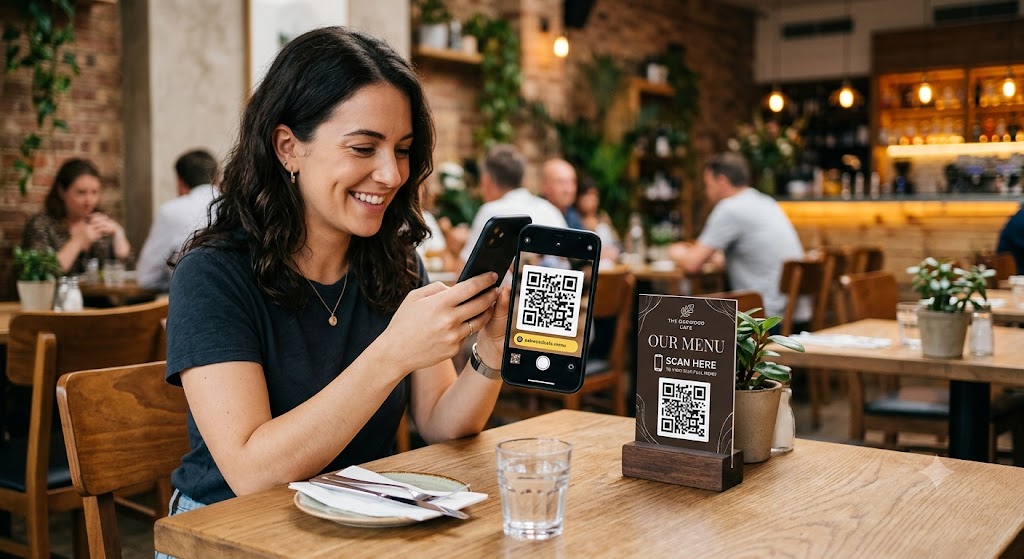
You don’t really see the old-style printed menus as much anymore, not because they were bad, but because they had to be constantly revised, and reprinting can get costly fast. Nowadays diners tend to want things quicker, easier, and a more contactless feel. QR code menus tick those boxes, and they can also help restaurant owners smooth out day-to-day tasks so the whole operation runs more efficiently.
So whether you run a café, a fine dining spot, a food truck, a cloud kitchen, or a quick-service restaurant, adding a QR menu can lift your business while also cutting down on the annoying operational headaches. Here in this guide we’ll go through what you need to know, including setup, benefits, and some practical tricks for getting the best results from it.
What Is a Restaurant Digital Menu With a QR Code?
A digital Menu QR code of the restaurant is a type of scannable barcode that leads a customer to the website version of the restaurant menu. The customer just needs to use their cameraphone to read the QR code so that the menu will open in their browser without installing an app.
Unlike paper menus, digital menus have these features:
- Great looking food photos
- Well-written descriptions of the menu items
- What ingredients the dish is made up of
- Information on allergens
- Pricing
- Suggestions of the day / daily specials
- Special offers and promotions
- Links to order online
Menus change all the time because dishes come and go in the kitchen. With paper menus, restaurants have to keep printing new menus, which is expensive. A QR code menu makes it fast and easy to display a new menu for customers as soon as it's available and no paper is involved.
Why Restaurants Are Turning to QR Code menus
Consumers have gone online for everything, including fast food delivery. The shift to QR code restaurant menus provides convenience while helping reduce costs related to traditional operations and improving the quality of customer service.
Main reasons for a restaurant to implement the QR code menu
Hygienic Dining
Most of the customers these days look for hygiene-friendly options. The QR code menu removes the physical menu and hence a paper menu being shared in person so it is more sanitary to dine that way.
Real-time Menu changes
It takes some time from a restaurant's decision to change menu items to getting their new printed menus ready. QR code restaurant menus allow you to edit your offerings quickly, be it a sale item or a recipe change.
No more printing paper
Restaurants save money not printing menus that are always changing anyway.
Increased efficiency
Absently, customers start perusing your menu while at the table. It is a major win for your restaurant in terms of speeding up service, shorter customer waiting times, and higher table turnovers.
Saving the environment
Your transition to digitizing menus will help reduce your paper waste and your restaurant will become a greener one.
What's the procedure to set up a QR code restaurant menu?
Making this happen is a breeze and it can be summed up in these steps:
- Design your digital menu.
- Publish the menu on your restaurant website or in a menu app.
- Get the QR code, which is a link to the digital menu.
- Stick the QR code to your tables, counters, receipts, and flyers.
- To view the menu customers will utilize their mobile phones to scan the QR code.
- Many places use such QR code menus to add online ordering, make appointments, or provide other functionalities in the payment processing so that everything stays very smooth and the customers will not get stressed.
Creating a Restaurant Digital QR Code Menu in Four Simple Steps
Setting up a QR code menu is quite the opposite of what most people think; you certainly do not need to possess high-tech skills.
Step 1: Create Your Electronic Menu
Start by designing an online version of your menu suitable for mobile devices and include:
- Different groups/types of foods
- Names of dishes/items
- Cost of each item
- Short details of each item
- Photos (optional but very useful)
- Hints on ingredients and allergies
- Time-limited deals
Keep the entire menu design uncluttered but very readable.
Step 2: Pick a QR Code Maker
It's very helpful to choose a qr code menu maker that helps you produce dynamic qr codes, meaning you can change the menu without modifying the printed code.
Come up with a platform that offers you:
- Changeable QR Code
- Tracking Data of your QR Codes
- Away to Easily Edit Your Menu
- Optimize for use on mobile
- Options to personalize your QR
- A menu split into several categories
Selecting the right tool gives you room to change as and when your restaurant expands.
Step 3: Making of Your QR
After preparing the menu, get a QR generated that directs to the URL of the online menu.
Do these things when the QR is not being scanned yet:
- Make sure that it works on android phones.
- Ensure that it is a fit for iPhones too.
- Make sure of the loading time when the menu is opened via QR scanner.
- Cross-verify that all the links and features of the menu are functioning well.
Step 4: Publishing Your Menu on Paper
Pick spots where your potential clients would easily reach your QR Code:
- At the table
- At the exit
- At the bar counter
- On paper bills
- In the takeaway boxes
- Through the glass windows display
A small note such as "Scan to See Our Menu" motivates the customers to use it without hesitation.
Step 5: Regular Updating
Keep the printed QR code as well as the electronic restaurant menu in alignment with your physical restaurant menu by changing them from time to time and highlighting the following:
- Launch of a new product
- Monthly special menu
- Changing of price tags
- Stock out/stock in items
- Special discount campaigns
This way customers always find it easy and a joy to look at your menu.
Benefits of Using a Digital Restaurant Menu QR Code
Improved Customer Experience
Faster access to the menu is one of the greatest advantages. Customers do not have to wait for the servers and can easily go back and re-read portions of the menu if they want. This feature gives customers the freedom to be on their own timetable when going through the offerings.
Better Operational Efficiency
Staff have to work a lot distributing menus and answering the same questions over and over, and this time could be spent providing excellent customer service.
Reduced Printing Expenses
Every time changes are brought into the menu printing, the new version will mean money and resources wasted. So instead of that digital menu, QR codes will help save money while making operations more efficient.
Valuable Business Insights
It's not just about the customers. Restaurants too can leverage on the data available through various QR code platforms such as:
- Number of times the code was scanned
- Which parts of the menu attracted most of the viewers
- Hours when there is the highest number of people checking the menu
- Devices the users were scanning them with
With the help of such data, restaurants will be able to come up with marketing strategies and decisions to change the menu according to the customers' preferences.
Editing Menus in Real-Time
Restaurant staff can easily implement changes without having to print new menus by making all the alterations in one location from the central interface.
Rain Sales Potential
E-digital signage enables you to:
- Draw attention to top-sellers
- Introduce special Chef's creations
- Promote combinations
Retail layout and visual merchandising techniques have a good impact on consumer behaviour. Thus, by featuring products or services in the right location or area of the store, you can increase customer satisfaction.
Tips to Make Your QR Code Menu More Effective
Creating only the QR code menu doesn't make it a winning product. The optimization that focuses on enhancing the overall user experience is just as important. Therefore, here are the things you should look into.
Prioritize Mobile Responsiveness
Digital menu code will be the most popular on mobile devices, so making sure everything works well on these small screens without sacrificing quality is really important.
Keep Navigation Simple
Don't get too creative and overload people with too many options, as customers may get intimidated. Keeping things straightforward will lead to more satisfaction for your regulars.
Moving around the online menu is a breeze if the layout is clean and the information clearly displayed.
Use High-Quality Food Images
Restaurant photographs that are done professionally play a very important role when customers are on the fence.
Pictures need to be not only realistic representations of the dishes but also have the advantage of making the menu pages open fast.
Include Allergen Information
Besides the information about the ingredients, also mention the details about the presence of the allergens along with the options related to the different dietary preferences. It will help your customers make the right choice and your restaurant in building a good image in their eyes.
Highlight Popular Items
To make it clear to a lot of guests that these are your most loved dishes, use labels like the following:
- Best Seller
- Chef's Selection
- New Arrival
- Favourite
These are the types of things that make one's choice at the restaurant much faster if they are given some indication that certain dishes are particularly popular as well as the best ones on your menu.
Test the QR Code Frequently
In order to prevent situations when customers can't read their menu because you have changed it or the code is broken, the only solution is to check it from time to time.
Conclusion
A digital restaurant menu QR code is kind of more than just a contactless menu solution, you know. Like it can help restaurants bump up customer satisfaction, lower operational costs, make menu management a lot simpler, and even craft more engaging dining experiences. And when you team it with the right qr code menu maker, restaurants can update menus without stress, highlight special offers, monitor customer behaviour, and generally stay ahead in a fast-changing and competitive market.
If you’re thinking of digitizing your restaurant and offering a smoother ordering experience, working with a solid technology provider can really make the difference. FODUU focuses on building smart digital solutions for businesses, including tailored QR Code Menu Maker systems, restaurant websites, and eCommerce platforms. With the right expertise and an inventive approach, FODUU can help your restaurant move into digital transformation and create experiences people actually remember, which then supports sustainable growth.
Also Read: How a Digital QR Menu Maker Can Boost Restaurant Orders and Cut Costs
Great guide on digital menus! Switching from printed paper to scannable codes is definitely a smart move for modern restaurants. It saves printing costs, makes updating prices instant, and provides a much cleaner dining experience for guests. Mobile-friendly layouts really make all the difference.
Thanks for sharing this detailed overview! Going digital is definitely the right path for modern venues. We recently switched to a digital format in our cafe to update daily specials on the fly without reprinting paper menus. After trying a few tools, we ended up using the OddMenu qr menu code maker. It was super straightforward to configure on mobile and reduced our order waiting times noticeably.